
2x Ford AU Falcon/FPV/XR6/XR8 Car Series 2 & 3 99'-02' AU2/AU3 remote key New - The Remote Factory

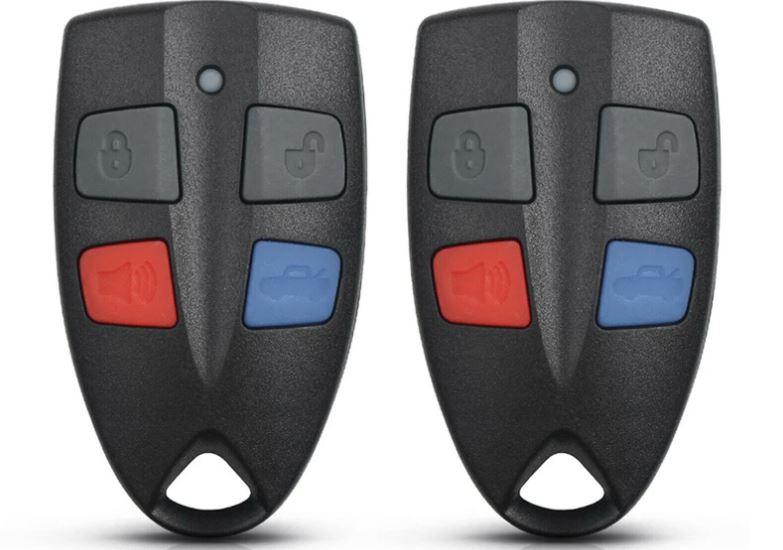
(2 Pack) Ford Falcon Car Remote Key Fob – Fits AU2 AU3 FPV XR6 XR8 1999–2002

$28.61
$28.61
Please hurry! Only 100 left in stock
Subtotal: $28.61
10 customers are viewing this product

Free Shipping

Free standard shipping on orders over $50

Easy Returns

Learn More.
2x Ford AU Falcon/FPV/XR6/XR8 Car Series 2 & 3 99'-02' AU2/AU3 remote key New - The Remote Factory

(2 Pack) Ford Falcon Car Remote Key Fob – Fits AU2 AU3 FPV XR6 XR8 1999–2002

$28.61

(2 Pack) Ford Falcon Car Remote Key Fob – Fits AU2 AU3 FPV XR6 XR8 1999–2002

$28.61
2x Ford Falcon/FPV/XR6/XR8 Car Series 2 & 3 99'-02' AU2/AU3 remote key New

  • This is a complete remote which will need to be programmed
  • Instructions supplied on programming remote below for you
  • Suitable for Ford Falcon Series 2 & 3 only
  • Basically if your current remote looks the same it will work
Program Instructions:
  • Sit in the car with the doors closed
  • Turn the ignition to the ACC postition and within 5 seconds press the rear demist button 3 times (Note this bit must be done all within 5 seconds from when key turn)
  • You then press a button on the first remote to be trained , the door locks will cycle.
  • Then press a button on the 2nd to be trained and the door locks will cycle again.
  • Repeat this step for the the rest of the remotes to be trained to the car.
  • The first keypad trained will result in one door lock cycle, the second will result in 2 door lock cycles, and so on.
  • There is a limit of 8 remotes per car.
  • Turn the ignition to the OFF position to exit the learning mode.
  • Your remotes are now programmed to your car.
  • Now if doesnt still work try same procedure again though this time lock doors before starting
Package Included:
  • 2 x Ford Falcon Remotes

Returns Policy

You may return most new, unopened items within 30 days of delivery for a full refund. We'll also pay the return shipping costs if the return is a result of our error (you received an incorrect or defective item, etc.).

You should expect to receive your refund within four weeks of giving your package to the return shipper, however, in many cases you will receive a refund more quickly. This time period includes the transit time for us to receive your return from the shipper (5 to 10 business days), the time it takes us to process your return once we receive it (3 to 5 business days), and the time it takes your bank to process our refund request (5 to 10 business days).

If you need to return an item, simply login to your account, view the order using the "Complete Orders" link under the My Account menu and click the Return Item(s) button. We'll notify you via e-mail of your refund once we've received and processed the returned item.

Shipping

We can ship to virtually any address in the world. Note that there are restrictions on some products, and some products cannot be shipped to international destinations.

When you place an order, we will estimate shipping and delivery dates for you based on the availability of your items and the shipping options you choose. Depending on the shipping provider you choose, shipping date estimates may appear on the shipping quotes page.

Please also note that the shipping rates for many items we sell are weight-based. The weight of any such item can be found on its detail page. To reflect the policies of the shipping companies we use, all weights will be rounded up to the next full pound.

Related Products

Recently Viewed Products

2-Pack Ford Falcon AU2 AU3 Remote Key Fob — Fits FPV, XR6, XR8 1999–2002

This 2-pack is a complete remote key for Ford Falcon Series 2 and 3 models built between 1999 and 2002, including FPV, XR6 and XR8 variants, and it needs to be programmed to your car after purchase. Programming is done from inside the vehicle using the ignition and rear demist button in a specific sequence, and can support up to 8 remotes per car.

Which Ford models it fits

This remote is suitable for Ford Falcon Series 2 and 3 only, including the AU2 and AU3 generations, FPV, XR6 and XR8 models from 1999 to 2002. If your current remote looks the same as this one, it will work.

How programming works and buying notes

To program, sit in the car with the doors closed, turn the ignition to ACC and within 5 seconds press the rear demist button 3 times, then press a button on the first remote to train it (door locks will cycle once), then repeat for the second remote (door locks cycle twice), turning the ignition off to exit learning mode when done. If the shell has failed but your internals still work, the Ford BA/BF remote shell may also be relevant for later Falcon models. This item is stocked in Sydney for same-day dispatch and comes with a 30-day returns policy.

Because these AU2/AU3 remotes need to be trained into the vehicle's factory system rather than working immediately out of the box, following the demist button sequence precisely and within the 5-second window is essential for successful programming. Buying a 2-pack lets you program both remotes in the same session, since each additional remote simply repeats the training step and adds one more door lock cycle to confirm it has been accepted.

Frequently asked questions

Do I need to program this Ford AU2/AU3 remote after it arrives?

Yes, this is a complete remote that needs to be programmed to your car following the ignition and demist button sequence described in the listing.

Will this remote work with my 2001 Ford Falcon XR6?

Yes, this remote is suitable for Ford Falcon Series 2 and 3, including the AU2/AU3 generation XR6 built between 1999 and 2002.

How many remotes can be programmed to one Ford Falcon?

Up to 8 remotes can be programmed to a single Ford Falcon Series 2/3 vehicle using this process.

What if the programming does not work the first time?

If programming does not work, try the same procedure again, this time locking the doors before starting the sequence.

Related products